Last week we tackled HubSpot's lifecycle stages and how to build them for multi-motion go-to-market strategies. This week, we're diving into Salesforce.
Here's the fundamental difference: HubSpot has a native lifecycle stage function. Salesforce? You build your lead stages from scratch using flows.
The upside is that flows are extremely powerful. They allow for easier backwards and forwards movement than HubSpot's tricky stage regression setup. The downside is that it's stupidly easy to over-engineer lead stage logic and cause significant system breakdowns that can actually impact pipeline production.
🙈🙉🙊
Getting lead status and lead stage right are fundamental to qualified lead handling and pipeline generation. So remember the mantra: test, test, test, then deploy.
Lead stages are the equivalent to Lifecycle Stages in HubSpot. They are milestones that show how far a contact has progressed in the customer lifecycle. I also think about them in terms of the Winning By Design Bow-Tie method.
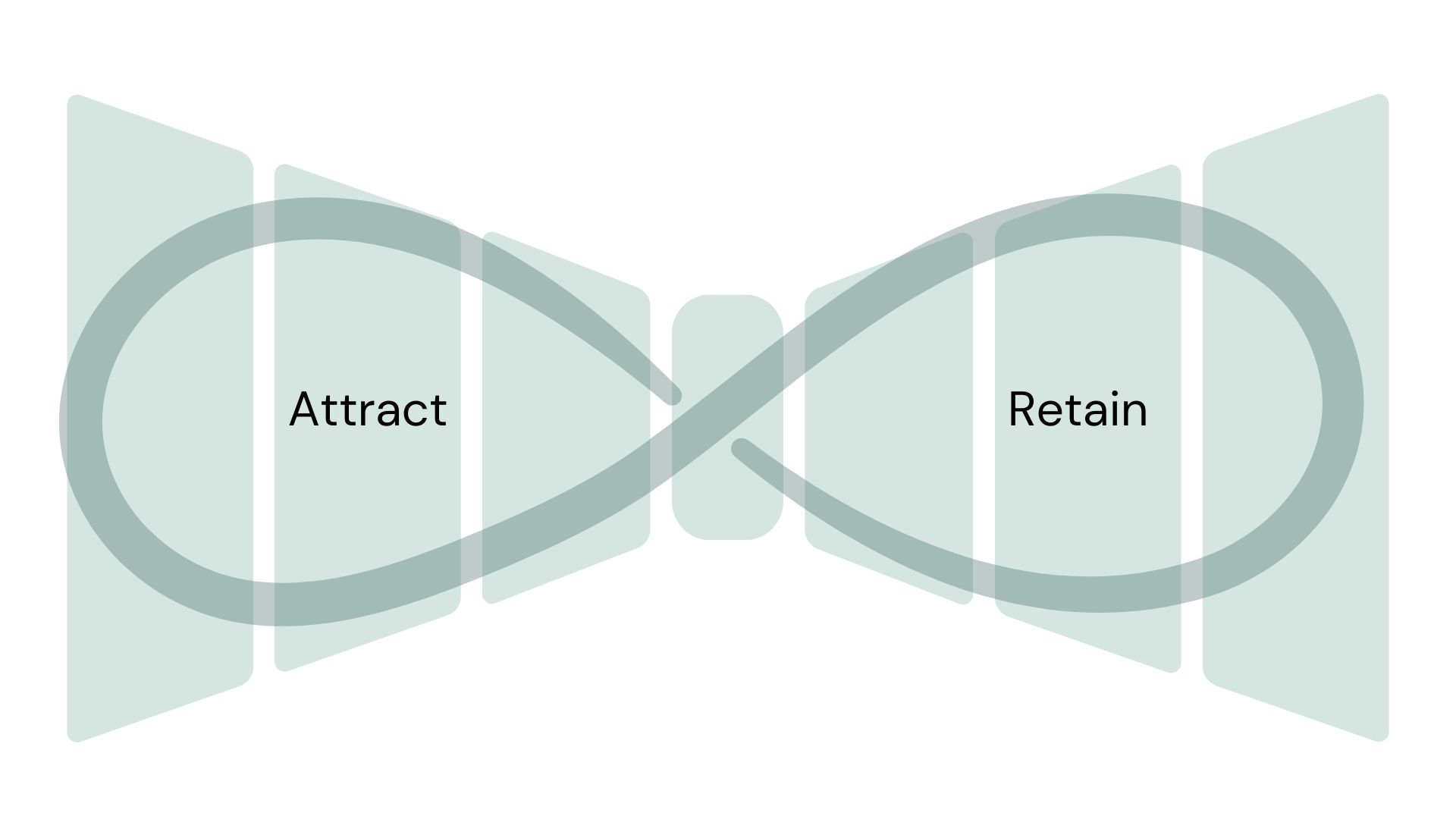
These lead stages do hold common KPIs businesses rally around. But they don’t provide a complete picture of how well each team is performing. Marketing should use early indicators from web analytics and advertising platforms to refine their work. Sales has pipeline stages and forecasting to determine progress against goals.
(That statement may seem obvious, but I’ve had to talk marketing teams out of relying too heavily on lead stage reporting as a success measure for their team.)
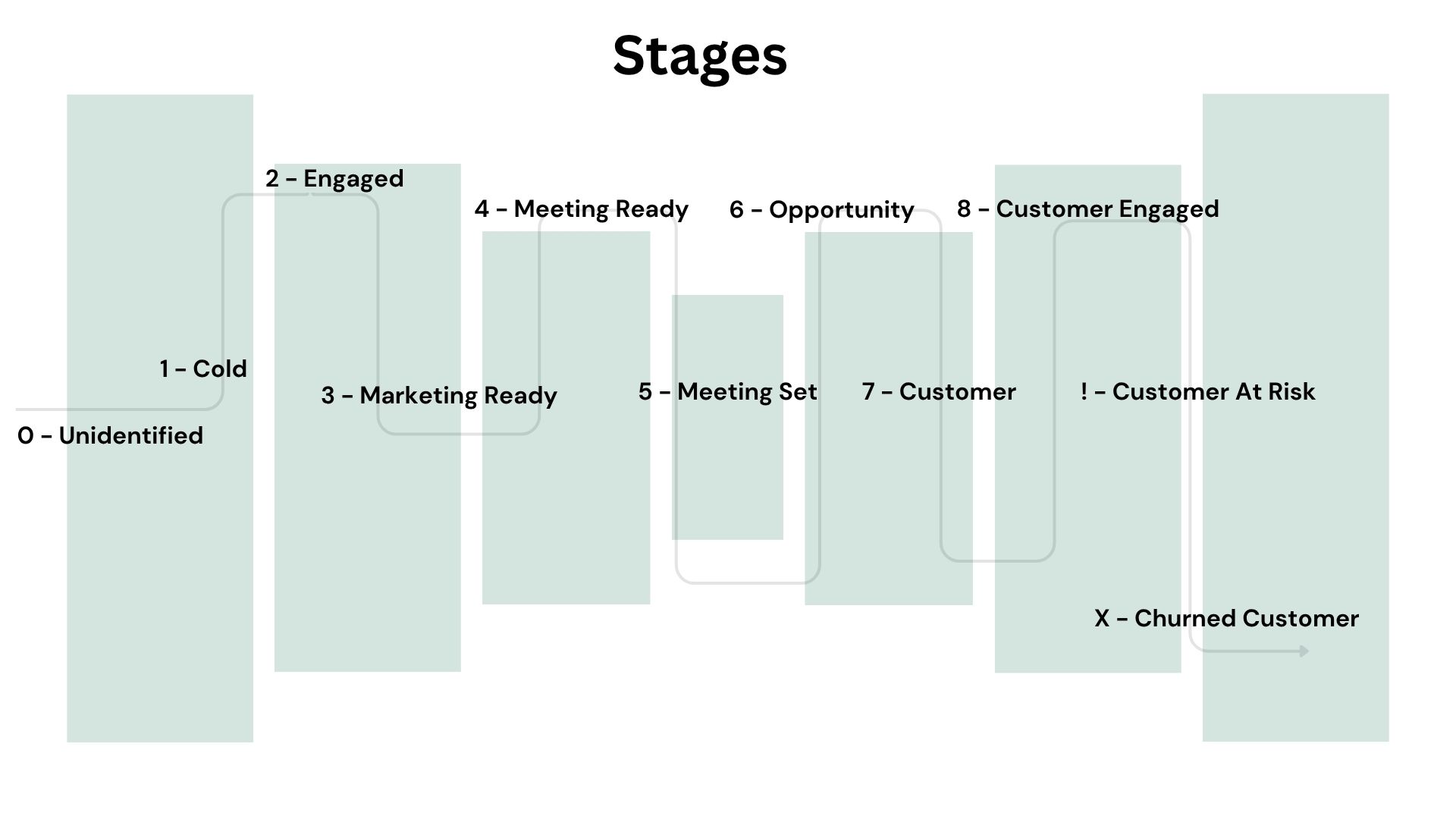
Here are the lifecycle stages I frequently use for both contacts and accounts:
0 - Unidentified: This stage typically lives in data tools connected to Salesforce and represents a person who has visited the website but is still anonymous. A Salesforce record is not usually created at this stage to represent the person.
1- Cold: Never engaged with the brand. Name acquired through enrichment, prospecting tools, or list purchases.
2 - Engaged: Showed attention through form fills, content downloads, event attendance, or other trackable activity signals.
3 - Marketing Ready: Opted into marketing communications. Marketing contact status equals yes in your system.
4 - Meeting Ready: High-intent signal indicating readiness for sales conversation. Could be demo request, trial signup meeting intake form, or product usage threshold. Custom business logic required; don't guess at this.
5 - Meeting Set: Agreed to a qualifying meeting with sales. Typically triggered when an opportunity is created at stage zero or when a meeting is booked.
6 - Opportunity: Sales has qualified an opportunity. Triggered when an opportunity meets or exceeds your qualified stage threshold.
7- Customer: Active paying customer. Triggered by opportunity close date or company-level fields synced from your ERP.
8 - Engaged Customer: A customer actively involved in a renewal or expansion opportunity. Note that auto-created renewal opportunities will make layering on additional engagement signals necessary.
! - At Risk Customer: A customer who has disengaged from your team and product. These signals can be picked up in service escalations, Slack communications with your team, recorded calls, and/or product engagement signals.
X - Churned Customer: All contracts and line items have expired.
Partner: Identified as a partner, distributor, or VAR in your system.
Archived: No longer employed or company out of business.
It’s important to consider scenarios where it makes sense to move backwards in the funnel. For example, if an account has opportunities that have since all been marked closed lost, and a contact re-engages by asking for a demo, doesn’t it make sense to surface that to sales as a lead? (THE ANSWER IS YES.) How about when a customer churns and later asks to re-engage through a demo?
Think through these possible scenarios and remember, according to sources like Gartner, 90% of B2B sales are not linear. Not building your processes to accommodate these movements is short-sighted. It’s also why we think separating the lead object as marketing’s engagement with a person and a contact as sale’s record of engagement with a person is ridiculous, which you can read more about here.
Note: These should all be considered placeholder definitions. You'll need to get specific requirements and buy-in from your stakeholders to make your lead stages last.
All the complexity from the HubSpot article applies here. Multiple go-to-market motions, source-agnostic stages, backwards movement infrastructure. But Salesforce adds another layer of hell: the lead object.
I've written before about why the lead object should be bypassed whenever possible. The short version is that it's an abomination designed for a linear buyer journey that doesn't exist in B2B.
The lead object represents both a person and a company simultaneously. It was created to simplify form integrations when you only have an email address. That's fine for product-led growth or direct-to-consumer. It's a disaster for B2B companies that sell to accounts with buyer committees and non-linear sales cycles.
Here's the problem: unless you have a tool that can help you automate associating leads to accounts, it's going to be really hard to aggregate lead stage data at the account level. Which is critical for B2B businesses that sell to companies, not individual people.
Even if you do have account association tooling, it's incredibly difficult to aggregate that data across multiple objects if you don't automatically convert leads into contacts. You end up with lead stage history trapped on the lead object, contact stage history on the contact object, and no clean way to combine the two and roll it all up to the account without exporting to an external database.
So my strong recommendation is to minimize your use of the lead object. Auto-convert leads to contacts whenever you have enough information to associate them with an account. Don’t think of them as “the marketing portion of the buyer journey” and acknowledge you’re selling into an account and need a way to surface qualified contacts. Reserve the lead object only for personal email addresses where you genuinely can't identify a company.
That said, you still need to manage lead stage on both objects because there will be unmatched leads no matter how good your matching software is.
Just like in HubSpot, you're probably running multiple go-to-market motions:
1. Inbound marketing: funnel visibility starts at engaged or marketing ready
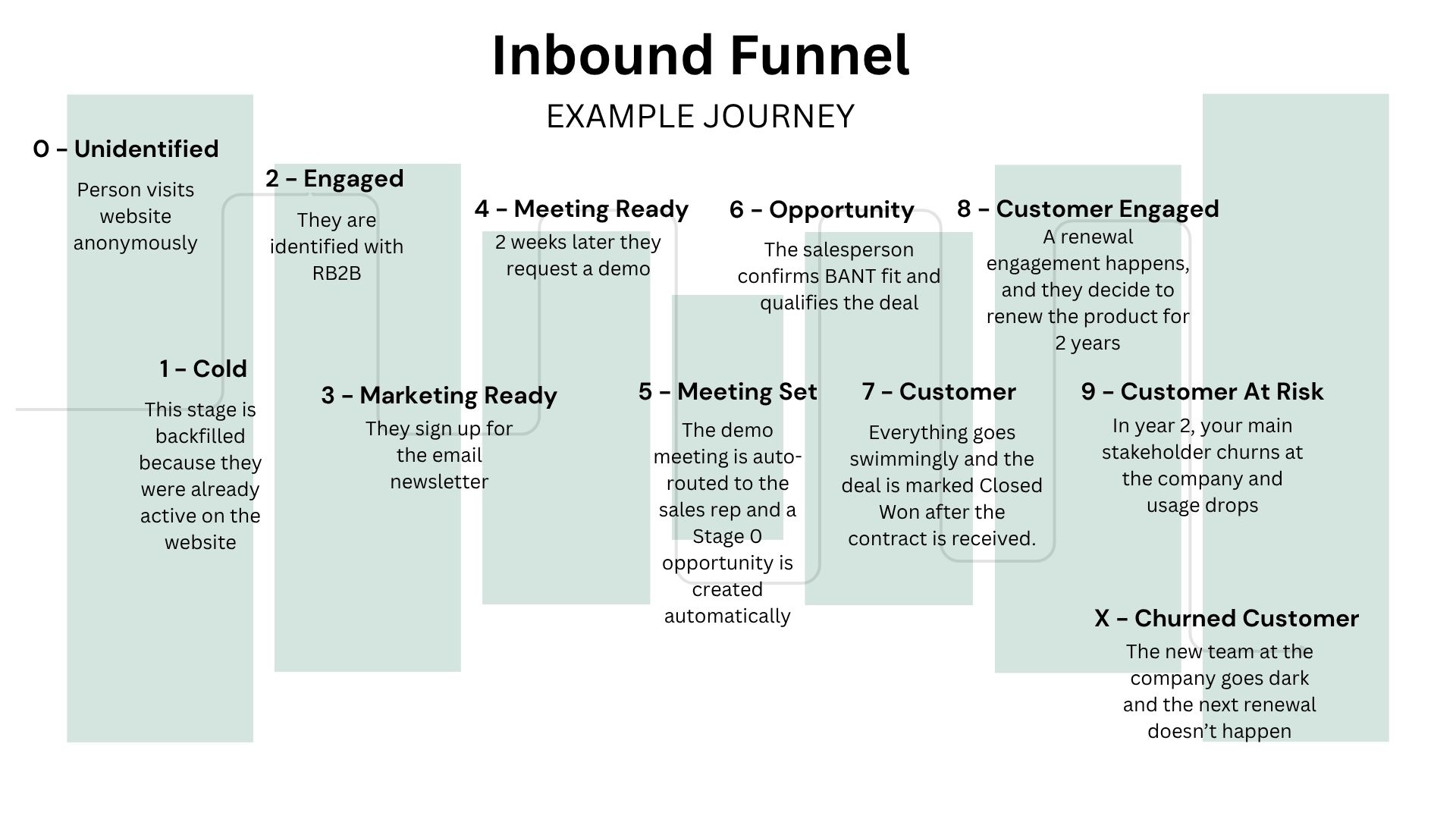
2. Inside sales (BDR/SDR): funnel visibility often starts at meeting set
3. Full-cycle sellers (AEs): funnel visibility sometimes starts when they create an opportunity
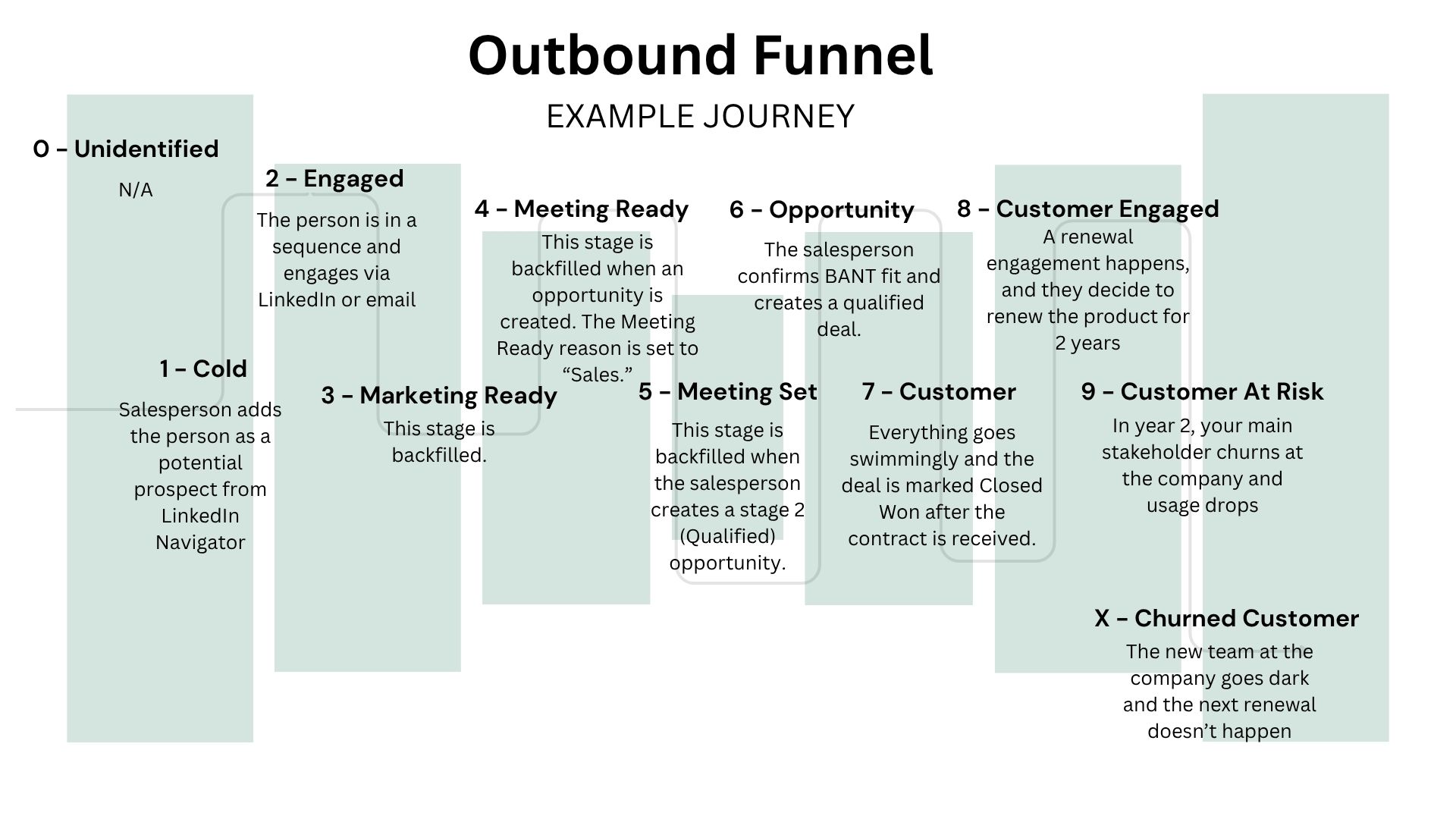
4. Product-led growth: starts at qualified based on product signals, not marketing signals
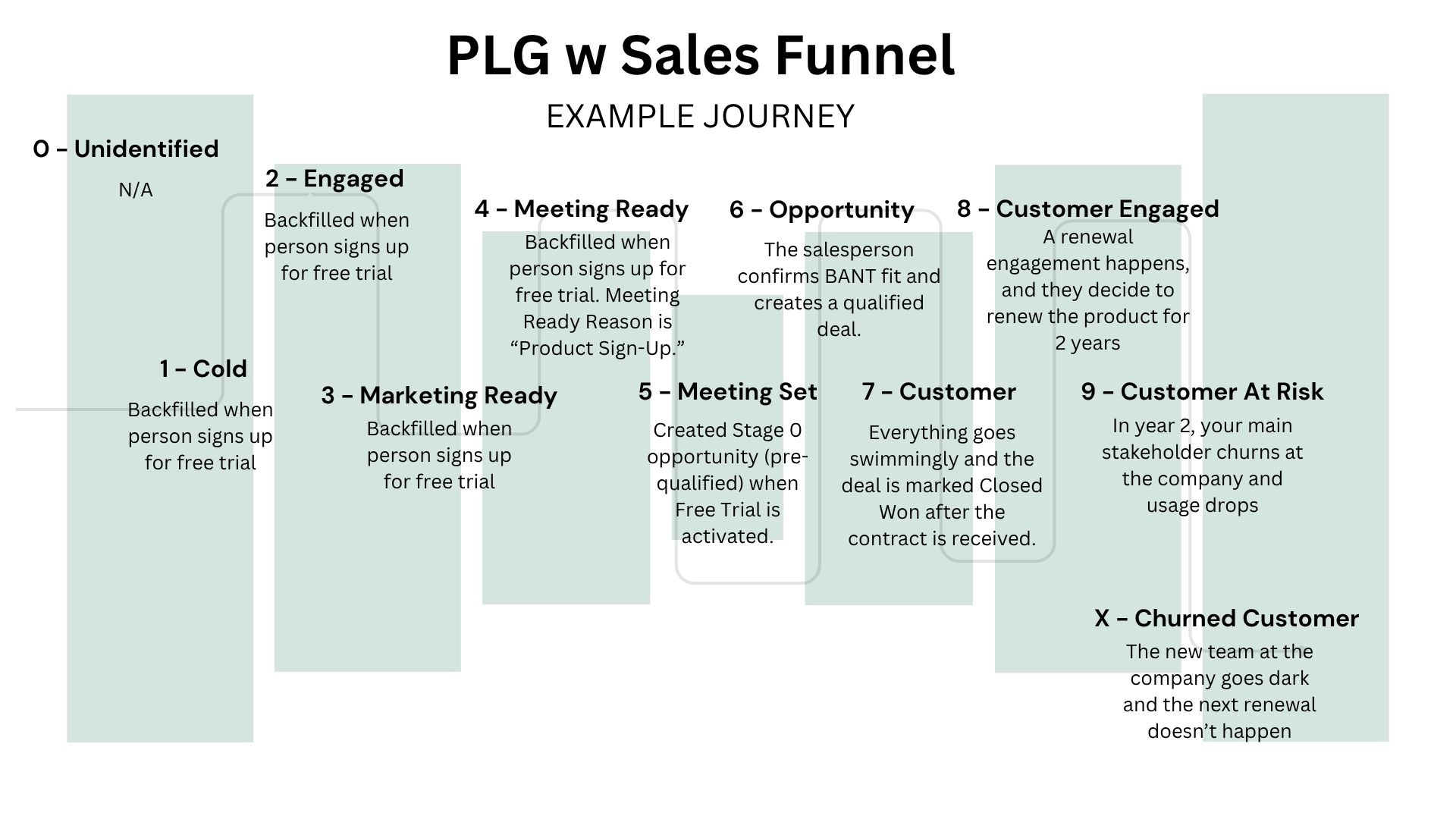
The solution is the same as HubSpot: build lead stages that are source-agnostic. They capture the milestone. Then use a custom field updated via flow that captures the motion that created it.
Here's an example: once someone has raised their hand to talk to sales or opted into a free trial, I put them into a meeting ready stage. I also create a meeting ready reason custom field that's populated by flows. The reasons someone can enter this stage are PLG (product-led growth), marketing (the traditional MQL), or backfill since BDR and AE-led journeys typically pick up further down the funnel.
Creating source-agnostic stages and supporting custom fields allows you to report on which department drove each key lifecycle stage. This bypasses creating separate lifecycle tracks that nobody can make sense of and avoids building a 22-stage monster.
We can't assume everyone reads all of our blog articles (tell Matt if you think we should make an eBook/Audible read: RevOpsAF: The No Bullshit Approach to Everything RevOps) , so let's cover this quickly.
Lead stage versus lead status confuses people because the two fields overlap significantly. They’re also used on both the lead and contact objects. But that’s not as important because the fields are used the same way regardless of the object.
Here's the difference between the two fields:
Lead stage tracks where a person is in the buyer journey. It's a milestone indicator. Marketing acquired them, they became qualified, they agreed to a meeting, an opportunity was created, they became a customer. Lead stage follows the person as they enter, exit, and re-enter the buyer journey.
Lead status is how salespeople stay organized while working prospects. It's process-oriented. RevOps uses lead status to tell sales when a lead needs follow up, and sales (plus automation based on opportunity and company signals) use the status to tell us when they are working a lead and how it’s progressing.
Lead stage should inform lead status. And sometimes lead status informs lead stage.
Here's where Salesforce diverges significantly from HubSpot.
In HubSpot, it’s tough to fight how the system is engineered to build in the flexibility necessary to accurately accommodate a messy B2B buyer journey where people engage, disengage, re-engage, etc.
In Salesforce, the battle isn’t against the system. You get to build everything from scratch. The real battle is avoiding over-engineering your flows into a massive contradiction that results in missed opportunities.
A fight I have admittedly lost and fixed. More than once. 🙈 Which is why I recommend intense scrutiny via reports, dashboards, and regular audits, particularly in the days and weeks after a logic change.
Another piece of advice: make sure you leverage your AI buddies (here's looking at you ChatGPT, Claude, or whatever else) to document the absolute hell out of your flows so the next person who walks into your organization can make sense of it without having to reengineer all of it.
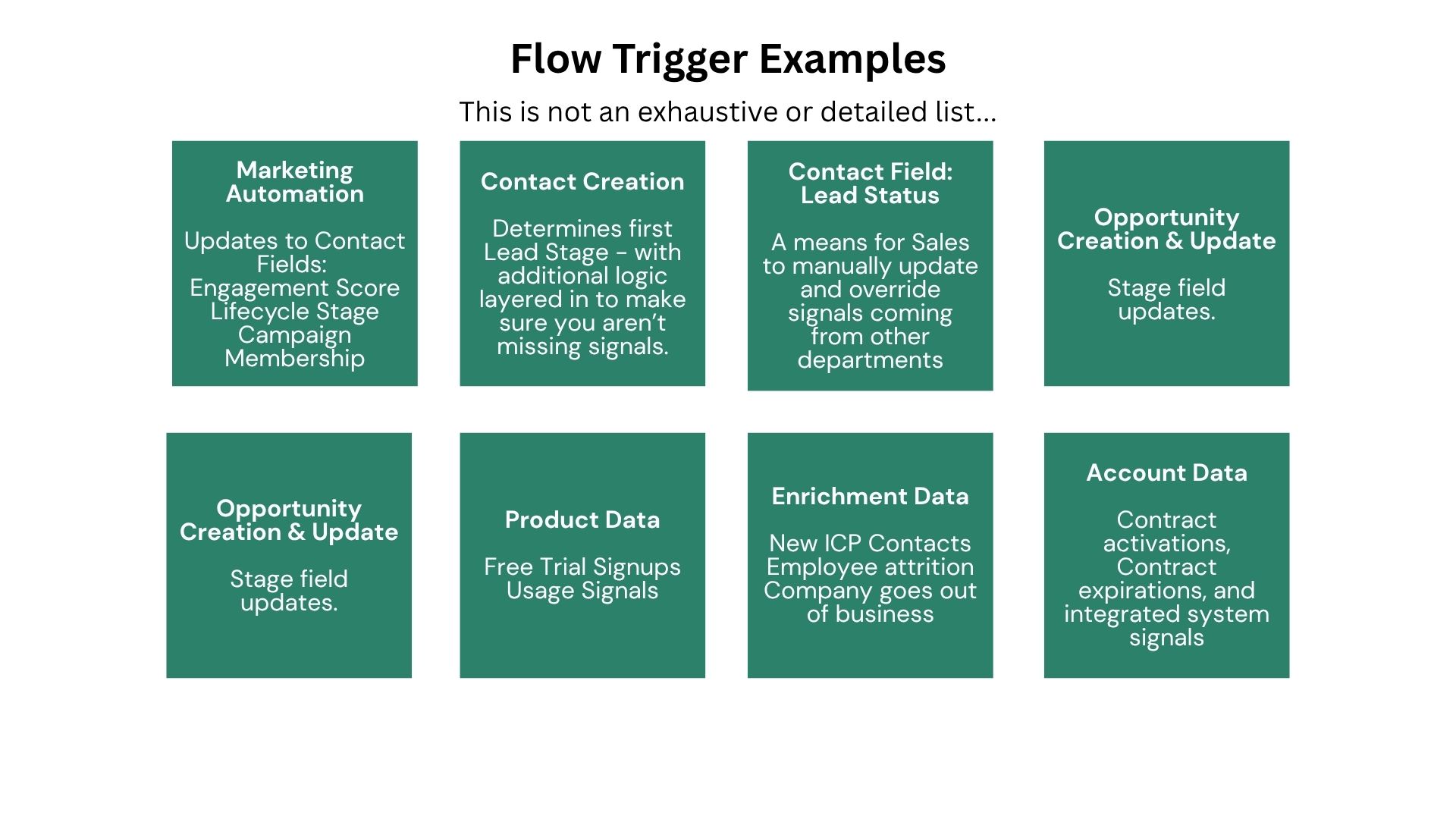
Instead of thinking about flows as journeys through the customer lifecycle, think through what could possibly trigger each stage. When you can cleanly identify all the scenarios that could trigger a stage, you’re ready to start building.
Here are some examples of what will trigger a stage, but this list isn’t exhaustive or necessarily representative of your definitions:
1 - Cold: Auto-populate on record creation, plus a catch-all flow for undefined or null values that slip through.
2 - Engaged: Trigger when an engagement score on the Contact record is populated by your marketing automation system. Also consider layering logic to capture whenever an activity record is logged (task, email, or meeting).
3 - Marketing Ready: Trigger when a communication opt in happens. This should align with your email marketing consent requirements.
4 - Meeting Ready: Trigger on a subset of high-intent forms like demo requests or meeting intake forms, product signals defined by your business (usage thresholds, feature adoption), and list uploads tagged for inside sales follow-up. This is custom business logic that must be explicitly defined. Don't guess at this one.
5 - Meeting Set: Trigger when a “Meeting Set” or pre-qualified opportunity is created. Update the primary account to meeting set stage and all related contacts to meeting set stage.
6 - Opportunity: Trigger when an opportunity meets or exceeds your qualified stage. This can happen on create or edit. Update the primary account to opportunity stage and all related contacts to opportunity stage.
7 - Customer: Two options. Option one: auto-sync from opportunity close date. Option two: drive this from account-level fields synced with your ERP, like customer activation date and contract expiration date. Either way, your flow should push the lifecycle stage value to all related contacts.
8 - Engaged Customer: A renewal or expansion opportunity has contacts associated that have real activity (meetings, emails, and other signs of engagement) logged against them).
9 - At Risk Customer: This could either be a ton of signals compiled into a single account indicator or an integration with a tool that analyzes all of your signals for you.
X - Churned Customer Trigger when all contracts and line items have expired based on ERP data. Update the primary account to churned customer stage and all related contacts to churned customer stage.
Partner Once your partner field has been set to yes (or distributor, VAR, or however you've configured it), update the primary account and all related contacts to partner.
Archived Trigger when someone unsubscribes from all communications or their employment status is set to no longer employed. Only use this stage for an account if it goes out of business. In that case, roll down the value to all related contacts.
When you look at this from the systems and fields triggering your flows, it may look something like this:
If you want backwards movement, you'll need to build in the logic. I haven't outlined it here because which stages allow regression and how far back depend on your stage definitions.
I recommend the same field stamps in Salesforce that I recommended in HubSpot: custom date fields and counters for each stage.
Why not just use field history tracking? Because it's tricky to use field history when you insist on reporting on lifecycle stages in Salesforce. Field history lives in a separate object, and joining that data across leads, contacts, accounts, and opportunities gets messy fast.
Why not use a custom object for tracking stage progression? Same reporting complexity issue. You're adding another object to the mix when you already have leads, contacts, accounts, and opportunities to wrangle.
However, if your team has the talent and resources to export field history to an external database or data warehouse and architect logic and reports there, this is how I prefer to do things. Then you can get into fancy things like stage velocity and activity correlation analysis. 🤓
For most teams working inside Salesforce, custom fields on the contact and account objects are the most practical solution:
These fields are critical to troubleshooting and properly reporting on stages when you allow regression. You have to build this infrastructure yourself.
Salesforce flows make backwards movement easier to implement than HubSpot workflows. This is one area where building from scratch gives you an advantage.
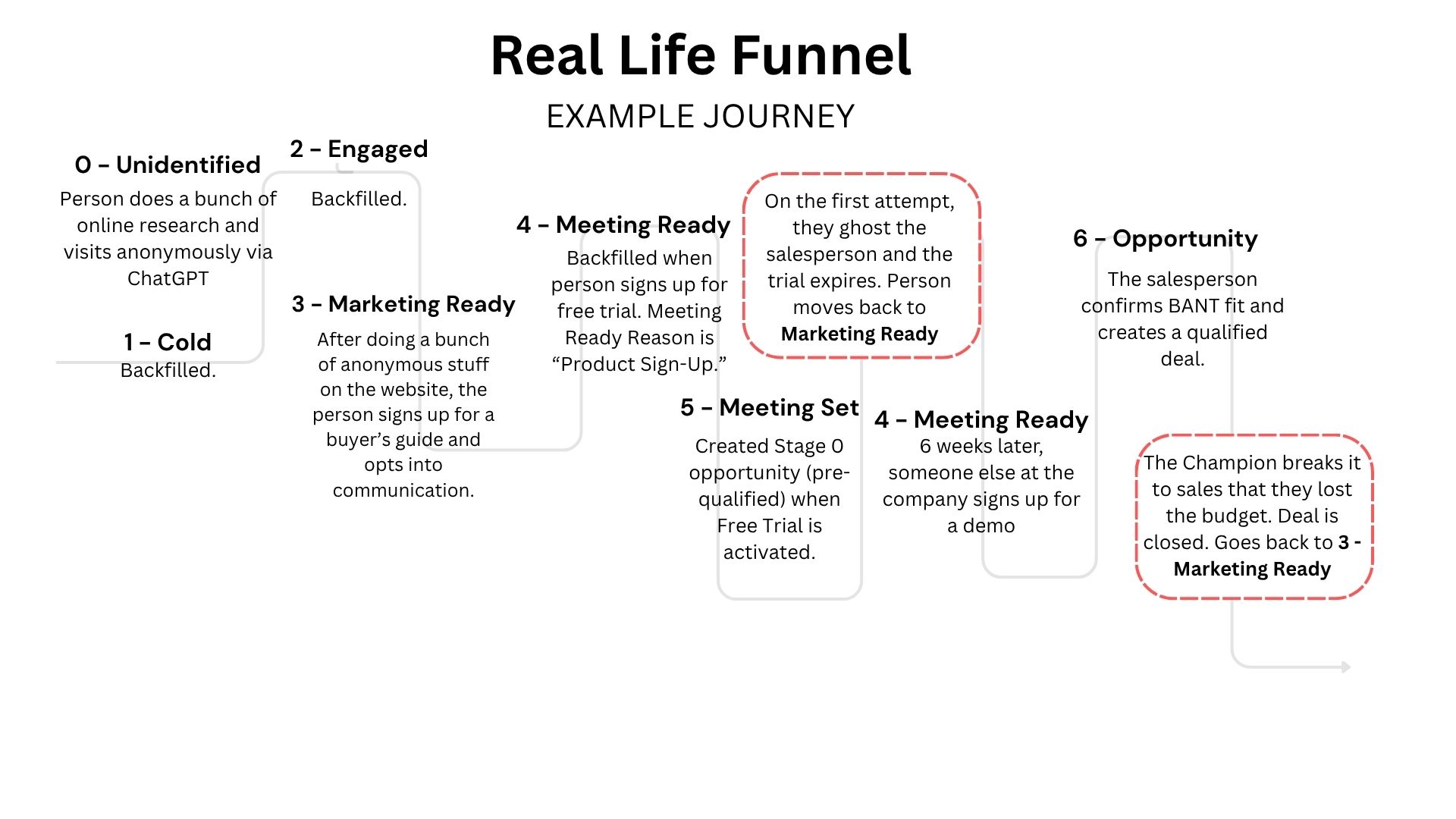
B2B deals aren't linear. People cycle in and out. Opportunities close lost, then re-engage six months later. You need to design for that.
Closed lost opportunities. When an opportunity closes lost on an account that has zero active contracts, you need to move those contacts back to marketing ready or engaged so they can re-enter the funnel. Let marketing nurture them until they're ready to talk to sales again. This is critical for long sales cycles and account-based strategies.
Meeting ready rejections. Even at meeting ready, you need a path backward. Sales might review a lead and decide not to pursue it, or they might have a quick conversation and decide not to schedule a meeting. You can't lock people into meeting ready. They need to be able to drop back so they can re-engage later when they actually become a sales-ready opportunity.
Renewal cycles for existing customers. Customers might need to be moved through opportunity stages again for renewals. This requires intentional logic so you're not accidentally resetting active customers. Or handle this in different fields on the account. Make sure to think through this scenario because it's crucial to mature businesses.
Here’s a pretty realistic scenario as an example:
Salesforce flows are powerful. They're also dangerous in the hands of someone who over-engineers them.
What we've covered:
The goal isn't perfection. The goal is a system that reflects how your business actually works, gives each team the visibility they need, and doesn't implode when someone changes a field value.
Test your flows exhaustively before deploying. Document them like your successor's sanity depends on it. Because it does.
In the next article of the series, we'll tackle the specific challenges of integrating HubSpot and Salesforce without creating misalignment that destroys trust between marketing and sales.